
Your Xbox already sits under the TV, so it makes sense to use it for live TV too. The good news: IPTV on Xbox works on Series X, Series S and Xbox One without any hacks. This guide shows the three ways that work, which app type fits you and the limits each console has.
Yes, you can watch IPTV on Xbox. Install an IPTV player app from the Microsoft Store, then add your M3U playlist or Xtream Codes login. You can also use Kodi with the PVR IPTV Simple Client add-on or official live TV apps such as YouTube TV and Sling TV.
Key Takeaways
- IPTV on Xbox works on Xbox Series X, Series S and every Xbox One model through apps from the Microsoft Store.
- IPTV player apps include no channels. You add your own playlist from a service you subscribe to.
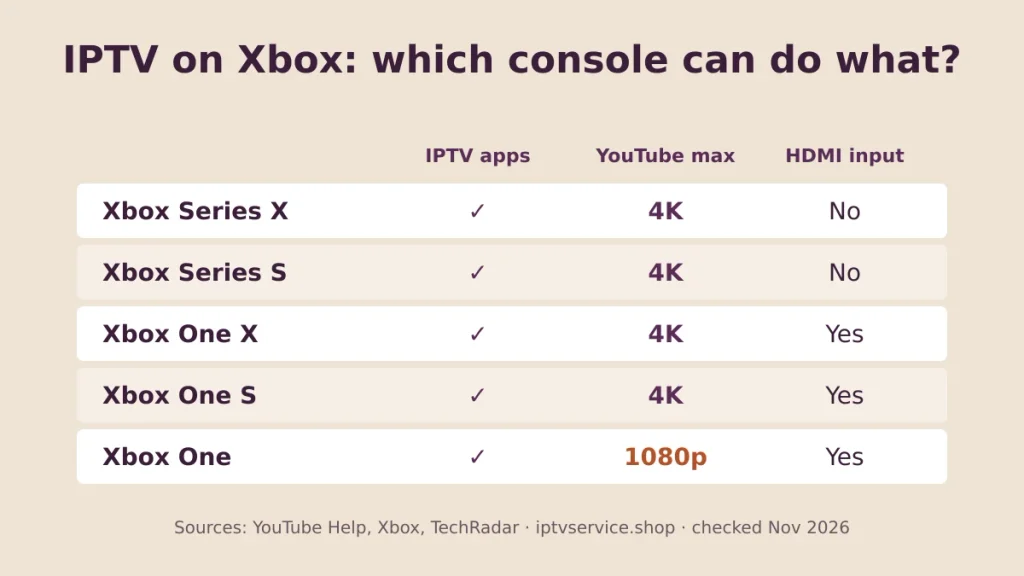
- Xbox Series X|S has no HDMI input and no OneGuide app, so it cannot act as a cable box.
- The original Xbox One plays YouTube at up to 1080p, while newer models reach 4K.
Can you watch IPTV on Xbox?
Yes. Every Xbox from the Xbox One onward runs apps from the Microsoft Store. That includes IPTV players. Xbox’s own console apps page says you open the Microsoft Store and go to the Entertainment section of Apps to install them.
IPTV simply means TV delivered over the internet instead of a cable or satellite line. If you want the basics first, read our guide to what IPTV is.
There are three ways to get IPTV on Xbox:
| Method | What you need | Program guide (EPG) | Best for |
|---|---|---|---|
| IPTV player app | M3U link or Xtream Codes login | Yes, in most apps | Anyone with an IPTV subscription |
| Kodi + PVR IPTV Simple Client | M3U link plus optional XMLTV guide link | Yes | People who already use Kodi |
| Official live TV app | A paid account with that service | Built in | Cord-cutters who want one brand’s channels |
Source: Xbox console apps page; Kodi wiki; Microsoft Store listings; YouTube TV Help; Sling TV, verified November 2026.
Which Xbox works best for IPTV?
Any Xbox One or Xbox Series console can run IPTV apps. The real differences are picture quality and TV inputs.
| Console | IPTV apps from the Store | YouTube max resolution | HDMI input | YouTube TV app | Sling TV app |
|---|---|---|---|---|---|
| Xbox Series X | Yes | 4K | No | Yes | Yes |
| Xbox Series S | Yes | 4K | No | Yes | Yes |
| Xbox One X | Yes | 4K | Yes | Yes | Yes |
| Xbox One S | Yes | 4K | Yes | Yes | Yes |
| Xbox One (original) | Yes | 1080p | Yes | Yes | Yes |
Source: YouTube Help on Xbox Series X|S; YouTube TV supported devices; Sling on Xbox; HDMI input from TechRadar and BGR coverage, verified November 2026. The resolution column shows what the YouTube app reaches on each console. An IPTV stream can only be as sharp as the source your provider sends.
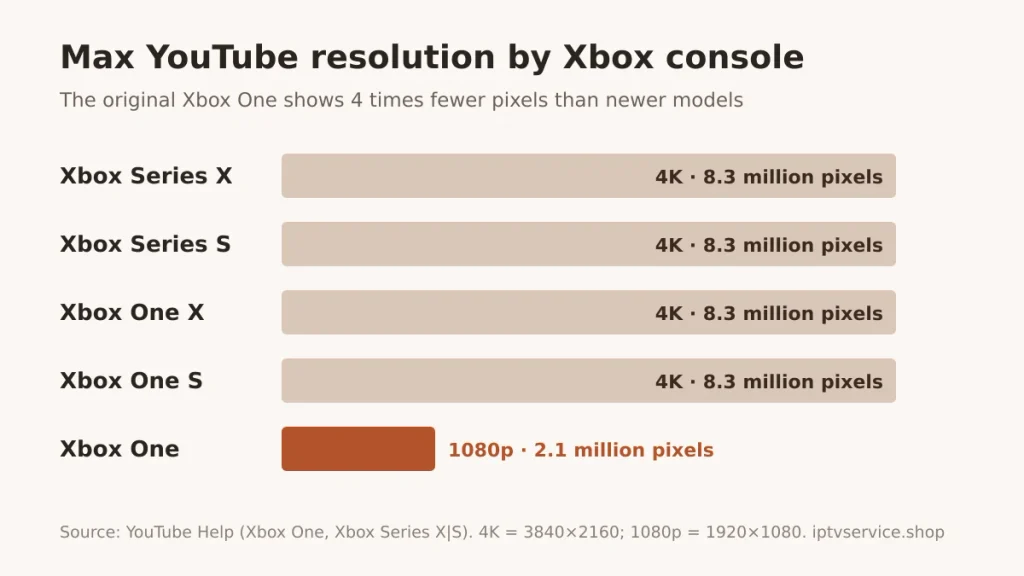
What the table tells you
- All five consoles run IPTV apps. You do not need the newest Xbox to watch IPTV.
- Only the original Xbox One stops at 1080p in the YouTube app. Every other model reaches 4K.
- Only Xbox One models have an HDMI input. Microsoft ended OneGuide’s live TV listings in May 2021, according to the March 2021 Xbox update post. Xbox One can still show a connected HDMI device through OneGuide. Windows Central reports that Series X|S does not have OneGuide at all.
Best IPTV player apps on Xbox
The best IPTV app on Xbox is one that supports your playlist type and is easy to control with a gamepad. Here is what four common options say about themselves.
| App | What its Store page says | Playlist types | Useful extras |
|---|---|---|---|
| Any IPTV Player | Built “for Windows and Xbox” | M3U | Loads 20,000+ channels in 5 to 6 seconds; QR code playlist transfer |
| Open IPTV | Made to watch “with your XBOX” | M3U8 and Xtream | Gamepad and remote friendly; free with in-app purchases |
| Best Player | Full Xbox gamepad support | M3U and XC (Xtream) | EPG; catch-up and timeshift via XC |
| MyIPTV Player | Free Store player that also runs on Xbox One | M3U | EPG; video on demand |
Source: Microsoft Store listings for Any IPTV Player, Open IPTV and Best Player; MyIPTV Player details from Windows Report, verified November 2026. Features are as each developer states them. We have not tested these apps.
Every one of these apps is only a player. Open IPTV’s listing says plainly that it “provides no content.” You need a playlist from an IPTV service you subscribe to.
Quick tip for typing: long M3U links are slow to enter with a controller. An app with QR code transfer, like Any IPTV Player, lets you send the link from your phone instead.
For a wider comparison across all devices, see our guide to the best IPTV player.
How to set up IPTV on Xbox with a player app
Setting up an IPTV player app on Xbox takes a few minutes. Have your M3U link or Xtream Codes login (server URL, username and password) ready before you start.
- Open the Microsoft Store on your Xbox. Go to Apps and then Entertainment. You can also use Search.
- Search for the player you chose, for example Open IPTV or Any IPTV Player.
- Select Get or Install. Wait until the download finishes.
- Open the app from My games & apps.
- Add a playlist. Pick M3U and paste your link. For Xtream Codes, enter the server URL, username and password instead.
- Add the EPG link if your provider gives one, so the program guide fills in.
- Wait for the channels to load, then choose a channel to start watching.
If channels do not load, check that you copied the full link. A single missing character breaks it.
How to watch IPTV on Xbox with Kodi
Kodi is a free media center that is available on Xbox through the Microsoft Store. The Kodi wiki says you install the Xbox version the same way as any other Store app. For IPTV, Kodi uses an add-on called PVR IPTV Simple Client.
- Install Kodi from the Microsoft Store on your Xbox.
- Open Kodi and go to Settings → Add-ons → Install from repository → PVR clients.
- Select PVR IPTV Simple Client and choose Install.
- Configure it from Settings → Add-ons → My add-ons → PVR clients. Add your M3U playlist URL.
- Add an XMLTV link for the program guide if your provider has one.
- Open TV from Kodi’s home screen to see your channels.
Source: Kodi wiki: PVR IPTV Simple Client, verified November 2026. The wiki also advises turning off other PVR add-ons first.
Kodi takes more setup than a dedicated IPTV player. It is a good choice if you also use it for local videos or other media.
Official live TV apps on Xbox
If you want cable-style channels from one company, official live TV apps work on Xbox too. They need their own paid account.
- YouTube TV: available on Xbox Series X, Series S, One X, One S and One, according to YouTube TV Help. Download it from the Xbox Store.
- Sling TV: Sling says it supports Xbox Series X, Series S and all Xbox One models.
- Other apps: Xbox’s own apps page also lists Netflix, Hulu, Disney+ and Apple TV in the Store.
Can you watch local channels on Xbox? Yes, through a live TV app that carries them. YouTube TV notes that devices without GPS may ask you to confirm your location with a phone.
Want to compare paid live TV services with other options? Our guide to alternatives to cable TV covers the main choices.
The honest limits of IPTV on Xbox
Xbox is a capable IPTV box, but it was built for games first. Here is what to know before you rely on it.
What it does well
- No extra device needed if you already own an Xbox.
- Several IPTV players are built for gamepad control.
- Newer consoles reach 4K in apps that support it.
Where it falls short
- No HDMI input on Series X|S. You cannot pass a cable box through the console. Fix: plug the cable box straight into your TV.
- Typing links with a controller. Long M3U links take time. Fix: use an app with QR code or phone transfer.
- 1080p cap on the original Xbox One in the YouTube app. Fix: an Xbox One S or newer if you want 4K.
- Player apps come from small developers. Features and updates vary. Fix: check the app’s Store page and reviews before you pay for an upgrade.
None of these are deal-breakers for most people. If you want a simpler remote-first setup, a dedicated streaming stick may suit you better.
Frequently Asked Questions
Is there an IPTV app for Xbox?
Yes. The Microsoft Store on Xbox has several IPTV players, such as Open IPTV, Any IPTV Player and Best Player. Kodi with PVR IPTV Simple Client also works.
What is the best IPTV player for Xbox?
It depends on your playlist. For Xtream Codes, pick an app that lists Xtream support, such as Open IPTV or Best Player. For a quick setup, an app with QR code transfer saves typing.
Can I watch IPTV on Xbox Series X and Series S?
Yes. Both consoles install IPTV players and Kodi from the Microsoft Store. They also support YouTube TV and Sling TV.
Can I watch IPTV on Xbox One?
Yes. Every Xbox One model runs the same Store apps. The original Xbox One plays YouTube at up to 1080p, while the One S and One X reach 4K.
Can I watch live TV on my Xbox?
Yes. You can use an IPTV player with your own subscription or an official live TV app such as YouTube TV or Sling TV.
Is the IPTV app legal?
IPTV player apps are legal software. They contain no channels. What matters is whether the service you add has the rights to its channels. Our guide to IPTV in the USA explains this in more detail.
Do I need a VPN to use IPTV on Xbox?
No. IPTV player apps on Xbox do not need a VPN to work. A service that holds the rights to its channels plays without one.
Final thoughts on IPTV on Xbox
IPTV on Xbox works well on every Xbox One and Xbox Series console. Pick a Store player that supports your playlist type. If you already know Kodi, that works too. Just remember the console only plays what you add. Your IPTV service supplies the channels.
Want to test a service on your Xbox before you commit? Our guide to IPTV free trials shows what to check.
Which app do you use for IPTV on your Xbox? Tell us in the comments.