
Search for “IPTV private server” and you get two very different answers. Sellers use the phrase for their TV service. Tech guides use it for software you run yourself. This guide explains both meanings, shows what a real IPTV server is made of and walks you through a legal home setup with real prices.
An IPTV private server means one of two things. In sales pages it describes a TV service that runs its own servers instead of reselling someone else’s streams. In tech terms it is software on your own computer that streams TV to your devices. You can build the second kind legally at home from about $110.
Key Takeaways
- “Private server” has two meanings: a provider’s own infrastructure or a server you run yourself.
- Every IPTV server has the same building blocks: a video source, streaming software, middleware and the apps you watch on.
- A legal home setup can start at $109.99 for a network tuner plus free Jellyfin software on a computer you already own.
- Business-grade IPTV server software costs far more. Wowza Streaming Engine starts at $195 per month before servers or content rights.
What is an IPTV private server?
An IPTV private server is either a provider’s own streaming setup or a server you run at home. The phrase has no official definition, so it helps to know which meaning a page is using.
| Meaning 1: a provider’s own servers | Meaning 2: your own home server | |
|---|---|---|
| Who runs it | The TV service | You |
| What you get | A login, an M3U link or an app | Your own channels streamed around your home |
| Where the channels come from | The provider’s sources | Your antenna, your own videos or feeds you have rights to |
| What you control | Nothing on the server side | Everything: software, storage, guide and devices |
| Main question to ask | Does the provider have rights to its channels? | Do you have the hardware and time to run it? |
Source: iptvservice.shop analysis of how the term is used on provider and software pages, November 2026.
In the first meaning, “private” usually signals that the provider runs its own servers rather than reselling another service’s panel. That can mean more control over uptime and support, but the word alone does not prove it. If you are new to how IPTV delivery works in general, start with our guide to what IPTV is.
The second meaning is the one this guide focuses on, because it is something you can build, check and control yourself.
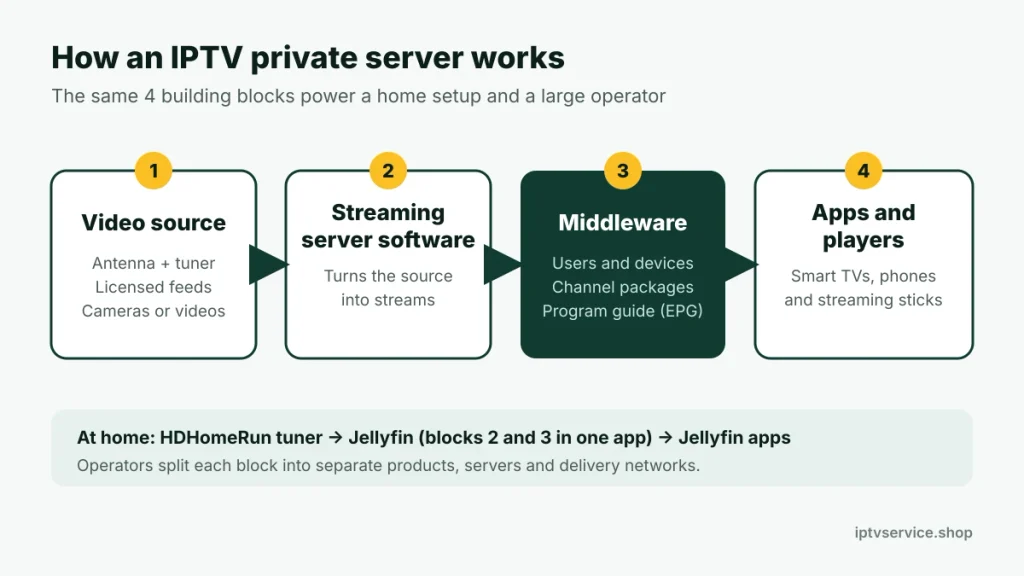
How IPTV servers work: the 4 building blocks
Every IPTV server, from a home setup to a large operator, is made of the same four parts. The difference is scale.
- A video source. This is where the channels come from: an antenna and tuner, a licensed feed, a camera or your own video files.
- Streaming server software. This is the IPTV streamer server. It takes the source and turns it into streams that devices can play over your network or the internet.
- Middleware. This layer manages users, devices, channel lists and the program guide.
- Apps and players. These are the screens people actually watch on, from smart TVs to phones.
The program guide ties it together. Without it, channels are just a list of names. Our guide to the electronic program guide (EPG) explains how guide data works. Large operators also add a delivery network so streams reach viewers fast, which our post on CDN in IPTV covers.
What is IPTV middleware?
IPTV middleware software is the management layer that sits between the streaming server and the viewer’s app. It handles who can watch, on which devices and with which channel packages.
Infomir, which makes the Ministra middleware, describes Ministra PRO as software that lets IPTV and OTT operators manage households, devices, content and tariffs. Infomir’s older middleware was known as Stalker. That is why some IPTV apps list “Stalker portal” as a login type. Infomir says Ministra PRO supports apps for iOS, tvOS, Android TV, Fire TV, LG webOS, Samsung Tizen and Roku TV.
For a home setup you rarely need separate middleware for IPTV. Media server apps like Jellyfin, Plex and Emby include their own user and device management.
IPTV server software you can run at home
For home use, five well-known IPTV software server options turn a computer into your own IPTV private server. Two are free. Three charge a subscription for live TV or recording.
| Software | Live TV cost | Inputs it supports | Runs on |
|---|---|---|---|
| Jellyfin | Free, no paid tiers | HDHomeRun tuners and M3U playlists | Your own computer or server |
| Tvheadend | Free (GPLv3 license) | ATSC, DVB, IPTV, SAT>IP and HDHomeRun | Linux, FreeBSD and Android |
| Plex | Live antenna TV free; DVR needs Plex Pass | Supported tuners and antennas | Plex Media Server |
| Emby | Live TV and DVR need Emby Premiere | Tuners and M3U playlists | Emby Server |
| Channels DVR | $8 per month or $80 per year | HDHomeRun and other sources | Windows, macOS, Linux, FreeBSD and NAS |
Source: official websites and help pages of Jellyfin, Tvheadend, Plex, Emby and Channels, verified November 2026.
What the table shows
- Only two of the five are fully free for live TV: Jellyfin and Tvheadend.
- Jellyfin is the easiest free starting point because it detects HDHomeRun tuners automatically and also accepts M3U playlists.
- Tvheadend has the widest input list but is aimed at more technical users on Linux.
- The paid options charge for convenience, such as polished apps and recording tools.
If you already use Plex for movies, our guide to IPTV on Plex explains what Plex can and cannot do with live channels.
How to build your own IPTV private server for free (or close to it)
The cheapest legal way to build a private IPTV server is an antenna, a network tuner and free Jellyfin software. You need a computer that stays on while you watch.
What you need first
- An antenna that picks up local channels where you live.
- An HDHomeRun network tuner. The HDHomeRun FLEX DUO costs $109.99 and records or streams 2 channels at once.
- A computer or NAS that can stay on.
- A home router with a free Ethernet port.
Steps
- Connect the tuner. Plug the antenna into the HDHomeRun and connect the tuner to your router. It should appear on your home network.
- Install Jellyfin. Download the free Jellyfin server and install it on your always-on computer.
- Add the tuner. In Jellyfin’s Live TV settings, add a tuner. Jellyfin’s documentation says HDHomeRun devices are usually detected automatically.
- Add guide data. Choose XMLTV or Schedules Direct as the guide source. Schedules Direct is a paid guide service for the US and Canada.
- Map your channels. Match each channel to its guide listing so the program names show up.
- Watch. Open a Jellyfin app on your TV, phone or browser. You should now see your local channels with a program guide.
You can also add an M3U playlist in step 3. Only use playlists you have the right to use, such as your own cameras or free channels that are offered legally. If you need a player for those streams, our guide to the best IPTV player compares the main apps.
What a home IPTV server costs
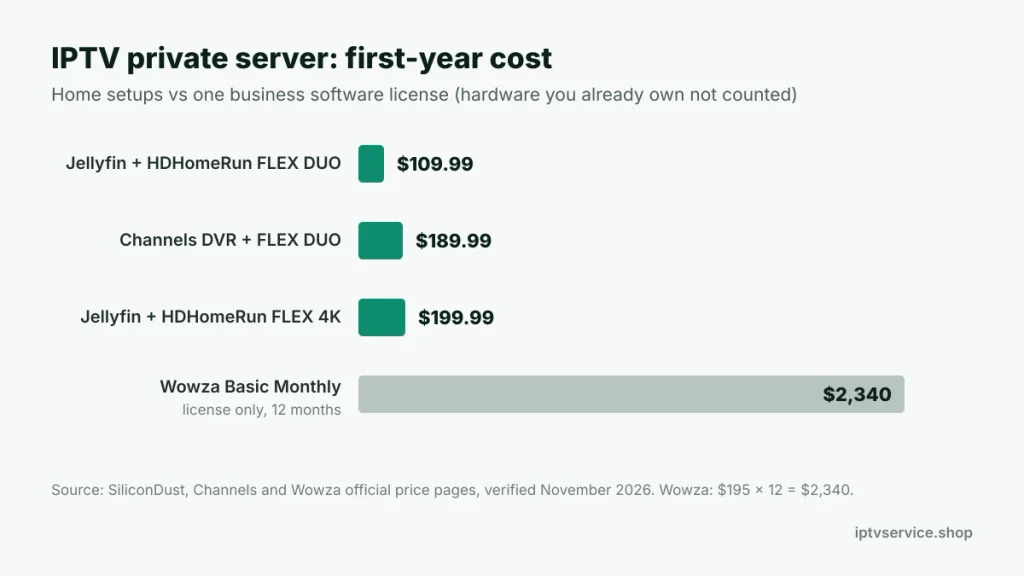
Here is the first-year cost of three home setups, using the prices above. It assumes you already own the computer and antenna.
| Setup | Tuner | Software (year 1) | Total year 1 |
|---|---|---|---|
| Jellyfin + HDHomeRun FLEX DUO | $109.99 | $0 | $109.99 |
| Channels DVR + HDHomeRun FLEX DUO | $109.99 | $80 | $189.99 |
| Jellyfin + HDHomeRun FLEX 4K | $199.99 | $0 | $199.99 |
Source: SiliconDust and Channels official price pages, verified November 2026. Totals: $109.99 + $0; $109.99 + $80; $199.99 + $0.
The FLEX 4K adds NEXTGEN TV (ATSC 3.0) on 2 of its 4 tuners. SiliconDust notes that some ATSC 3.0 broadcasts use DRM and may not play. In that case the tuner uses the regular ATSC 1.0 version of the channel.
Business-grade IPTV server software
Operators who stream to paying customers use professional IPTV server software. It costs far more than a home setup. The license is only one part of the bill.
- Wowza Streaming Engine: the Basic Monthly plan costs $195 per month and includes up to 10 concurrent transcoded channels.
- Flussonic Media Server: Flussonic’s pricing update set the minimum new subscription at $169 per month from January 15, 2024. Check the current price before you budget.
- Ministra PRO middleware: Infomir offers it to operators but does not publish a price on its product page.
A year of Wowza’s Basic Monthly plan alone is $195 × 12 = $2,340. That is before servers, bandwidth, delivery networks, support staff and the rights to the channels themselves.
What about offshore IPTV servers?
Putting a server in another country does not give anyone the rights to the channels it streams. Content rights come from the owners of the programs, not from where the hardware sits.
In the US, the Protecting Lawful Streaming Act of 2020 was signed into law on December 27, 2020. The USPTO explains that illegal streaming used to be treated as a misdemeanor. Under the new law, the Department of Justice can bring felony charges against providers of illegal streaming services, as opposed to their users.
This is general information, not legal advice. For a full look at the legal side, see our guide to IPTV in the USA.
Questions to ask any private IPTV provider
If you are looking at a service that calls itself a private server, a few questions tell you more than the label does:
- Who runs the servers? Ask whether they operate their own infrastructure or resell another service.
- Is there a trial? A short test shows real stability at busy times, such as live sports.
- What are the refund and privacy terms? These should be written down before you pay.
- Where do the channels come from? A clear answer about content rights is a good sign.
- How do you get support? Check the hours and the contact options.
The honest limits of running your own IPTV private server
A home IPTV server is cheap and fully under your control, but it comes with real trade-offs.
What it does well
- Low or no monthly cost after the tuner.
- You control the software, the recordings and who can watch.
- Local channels stream to every screen in your home.
Where it falls short
- You need an always-on computer. Fix: a small NAS or an old PC can do the job.
- US guide data may cost extra. Jellyfin lists Schedules Direct as a paid guide service. Fix: use free XMLTV data where it is available.
- Some features sit behind subscriptions. Plex DVR needs Plex Pass. Emby Live TV needs Emby Premiere. Fix: start with Jellyfin or Tvheadend.
- Docker setups need extra care. Jellyfin’s docs say Docker users with HDHomeRun tuners should use host networking. Fix: follow that setting from the start.
- Some NEXTGEN TV channels may not play. SiliconDust says DRM-encrypted ATSC 3.0 broadcasts may not be viewable. Fix: the tuner falls back to ATSC 1.0 where available.
None of these are deal-breakers for most people. If you would rather not run any hardware, a regular live TV service is the simpler choice.
Frequently Asked Questions
What is an IPTV private server?
It is either a TV provider’s own streaming infrastructure or a server you run yourself to stream TV around your home. The term has no official definition, so check which meaning a page uses.
How do I make my own IPTV server free?
Install free software such as Jellyfin or Tvheadend on a computer that stays on. Add a network tuner and an antenna for local channels. The software is free, but the tuner costs from $109.99.
Can I do IPTV myself?
Yes. You can stream your own antenna channels, cameras or videos to your devices with home server software. Streaming channels you do not have rights to is a different matter.
Is IPTV legal in the US?
IPTV is a legal technology used by many licensed services. What matters is whether a service has the rights to the channels it streams. Our guide to IPTV in the USA explains this in detail.
How much does it cost to run an IPTV private server?
A home setup can cost $109.99 in year one with a FLEX DUO tuner and free Jellyfin. Business software is far more expensive. Wowza’s Basic Monthly plan is $195 per month.
What is IPTV middleware?
IPTV middleware is software that manages subscribers, devices, channel packages and the program guide for an IPTV service. Infomir’s Ministra and its older Stalker middleware are well-known examples.
Does IPTV allow recording?
Many home server apps can record. Jellyfin supports watching and recording with supported hardware. Plex needs Plex Pass for DVR. Channels DVR includes recording in its subscription.
Final thoughts on IPTV private servers
An IPTV private server can mean a provider’s own setup or a server in your own home. The home version is the one you can fully check: a $109.99 tuner, free Jellyfin software and an antenna give you live local TV on every screen. Business-grade servers cost thousands per year before content rights.
Would you run your own IPTV server at home? Tell us in the comments.