
Last updated: November 19, 2026
You missed last night’s game or the episode everyone is talking about. With catch up IPTV you can often still watch it without having recorded anything. This guide shows how it works, how far back you can really go in the US and what to do when it fails.
Catch up IPTV lets you watch a program after it has aired by picking it from the past part of the TV guide. The provider keeps a rolling archive of each supported channel, so you never have to record anything. For most US channels that archive covers about the last 3 days (72 hours).
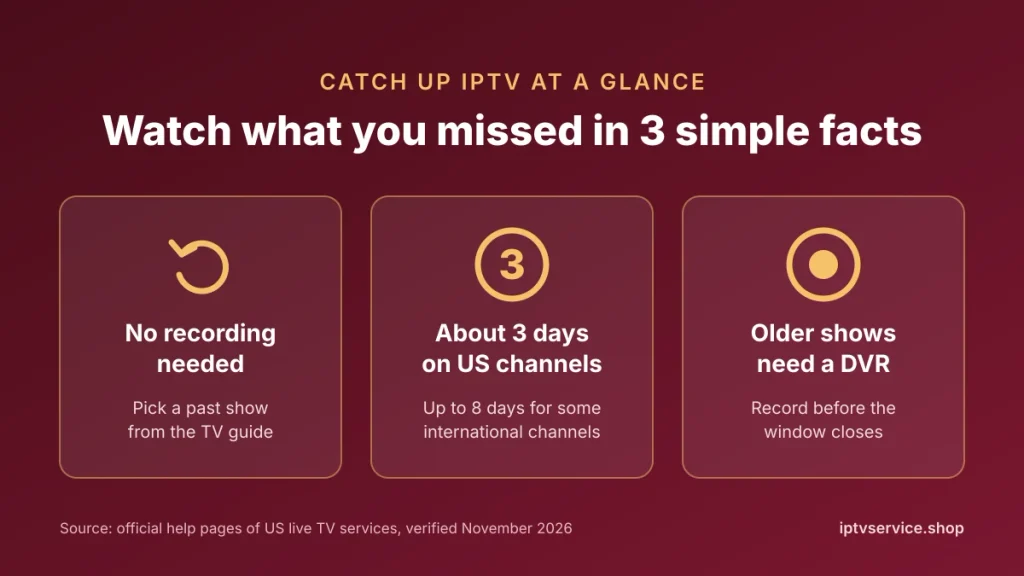
Key Takeaways
- Catch-up is a provider feature. Your app can only show it when the provider archives that channel.
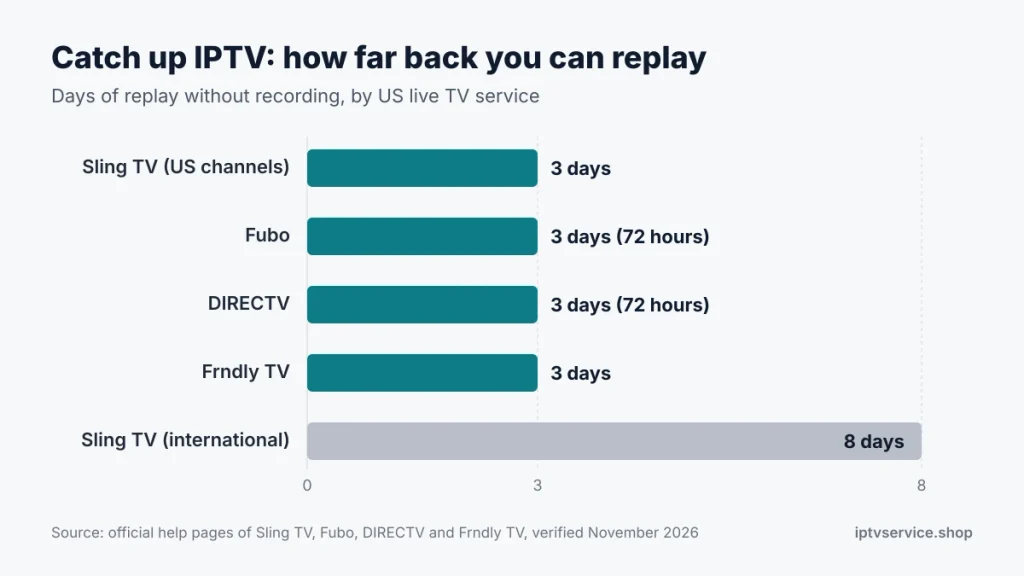
- We compared the official help pages of four US live TV services that let you replay shows without recording. All four keep most US channels for about 3 days.
- Longer windows are mostly for international channels. Sling keeps most of them for up to 8 days.
- For anything older than the window you need a DVR recording. YouTube TV and Hulu + Live TV rely on DVR instead of a replay archive.
What does catch up IPTV mean?
Catch up IPTV means watching a live TV program after it has already aired, straight from the program guide. You scroll back in the guide, pick the show and it plays from the start like an on-demand video.
The same feature goes by many names. You may see it called catch-up TV, catchup, TV archive, timeshift, replay, Lookback or Look Back. Searches for catchup IPTV or IPTV catch up TV point to the same thing: the service saved the channel’s broadcast for a limited time and lets you play any part of it.
Catch-up is one of several ways to watch time-shifted IPTV. It is different from on-demand libraries, which hold titles the channel chose to offer. Catch-up simply replays what aired.
How IPTV catch up works
IPTV catch up works because the provider records each supported channel on its own servers. Nothing is stored on your device. Here is what happens behind the scenes:
- The provider saves the live stream. Each supported channel is written to the provider’s storage as it airs.
- Old video is deleted on a schedule. Anything older than the archive window is removed, so the archive keeps rolling forward.
- The guide shows what aired when. The electronic program guide (EPG) lists each past program with its start and end time.
- Your player asks for that time slot. When you pick a past show, the player requests the channel’s archive from that start time and the server streams it back.
This is why a correct guide matters so much. If the guide times are off, catch-up can start in the middle of the wrong show.
What the playlist tells your player
For IPTV with catchup, the provider has to tell your player which channels have an archive and how to request it. In an M3U playlist this is done with tags on each channel line. The documentation of Kodi’s IPTV Simple client describes the common ones:
catchupsets the method used to build the replay request.catchup-sourceholds the URL pattern for the replay request.catchup-dayssets how many days back catch-up is available.
The same documentation also lists older styles such as a timeshift tag and modes for Flussonic and Xtream Codes servers. You never need to edit these as a viewer. They explain why one app shows catch-up for a service while another app does not.
How far back can you watch? US services compared
For most US channels you can go back about 3 days. That is the clear pattern when you put the official help pages of US live TV services side by side.
| Service | Replay without recording | How far back | Recording option | Good to know |
|---|---|---|---|---|
| Sling TV | Catch-Up TV | Up to 3 days for most US channels and up to 8 days for most international channels | Cloud DVR with 50 hours included | Included with every plan. Some ads can’t be skipped. |
| Fubo | Lookback | Up to 72 hours after air time | Cloud DVR (recordings kept 9 months) | Past games are listed by day on the Sports screen. |
| DIRECTV (via internet) | 72 Hour Lookback | Last 72 hours | Cloud DVR (titles kept up to 9 months) | Select shows only. It varies by network and season. |
| Frndly TV | 72-Hour Look Back | Last 3 days | Classic and Premium plans can record Look Back shows | Six channels do not offer it. |
| YouTube TV | No replay archive listed | Not listed | DVR with no storage limit | Recordings kept up to 9 months. |
| Hulu + Live TV | No replay archive listed | Not listed | Unlimited DVR (recordings kept up to 9 months) | You add a show to record it. |
What the table shows
- Four of six services offer a replay you don’t have to plan for. All four use a window of about 3 days (72 hours) for US channels.
- The only longer window in the table is Sling’s up to 8 days. That window is mainly for international channels.
- The two services without a replay archive in their help pages make up for it with large DVRs. Hulu + Live TV keeps recordings for up to nine months. The trade-off: you have to add a show before it airs.
Here is what a 72-hour catch up IPTV window looks like in practice. A game that ends Friday at 10 PM stays available until about Monday at 10 PM (72 hours ÷ 24 = 3 days). Miss that and only a recording will save you.
Why is it usually 3 days?
The window is set by rights deals with the networks, not by the technology. DIRECTV’s lookback page says networks and programmers supply this content and that it can change by season and availability. Back in 2015 TechCrunch reported that some Sling channels had a three-day window while others had none, because each content owner wanted to set its own terms. Today’s help pages show that most US deals have settled on about 3 days.
Catch-up vs DVR vs Start Over
Catch-up replays what already aired without any planning. DVR saves what you chose to record. Start Over only restarts the show that is on right now.
| Catch-up | Cloud DVR | Start Over | |
|---|---|---|---|
| Plan ahead? | No | Yes | No |
| How far back | The provider’s window, often about 3 days in the US | As long as the recording is kept | Only the current program |
| Which channels | Only channels the provider archives | Most channels you can watch live | Only supported channels |
| Who stores it | The provider | The provider | The provider |
Many people use both. Catch up IPTV covers what you forgot. DVR keeps what you want to watch later in the season.
How to use catch up on IPTV
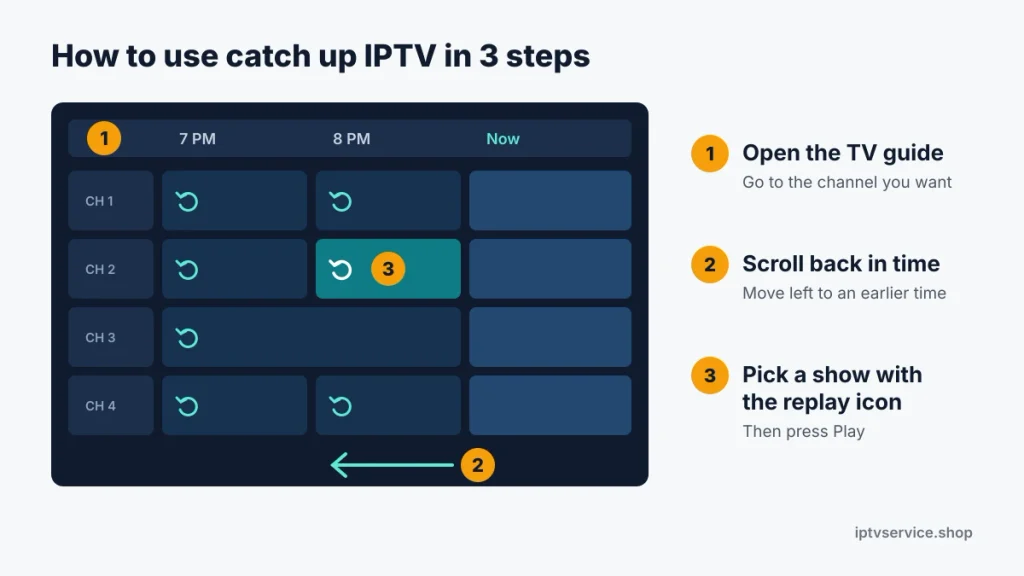
To use catch up on IPTV, open the guide, scroll back in time and pick a past program that shows a replay icon. The steps are close to the same in most apps:
- Open the TV Guide or EPG in your app.
- Go to the channel you want.
- Scroll left or back to an earlier time or day.
- Look for a replay, clock or play icon next to the program. Only those programs can be played.
- Select the program and press Play or Watch.
You should now see the show start from its beginning, with rewind and fast-forward.
A few examples from official help pages:
- MYTVOnline (Formuler boxes): past programs with a catch-up icon can be replayed from the grid guide. Formuler’s support page notes that catch-up depends on your service provider.
- DIRECTV: pick a channel in the Guide, choose an earlier day and select an eligible program.
- Fubo: Lookback puts news and entertainment shows in the on-demand screens. Past games are on the Sports screen.
In third-party players such as TiviMate or IPTV Smarters Pro, catch-up only appears when the provider sends the archive information. If you are still choosing an app, our guide to the best IPTV player compares the main options.
IPTV catch up not working? Causes and fixes
When IPTV catch up is not working, the cause is usually the channel, the guide or the app. Work through this table from the top.
| What you see | Likely cause | What to do |
|---|---|---|
| No replay icon on any past show | The channel has no archive | Try another channel. If none work, ask the provider which channels have catch-up. |
| The show you want is gone | It is older than the window | Check the window for that channel. Record it next time. |
| Catch-up starts in the wrong show | Guide time is off | Adjust the EPG time offset in your app settings. Refresh the guide. |
| Catch-up works in one app but not another | The app doesn’t support that catch-up method | Use the provider’s own app or a player that reads its catch-up tags. |
| A game shows but won’t play | Rights limits for that event | Some programs can’t be replayed even on supported channels. |
| Error right after pressing Play | Connection or server problem | Try a live channel. If live works too, wait a few minutes and contact the provider. |
For a refresher on setting up an app from scratch, see how to use IPTV.
The honest limits of catch-up TV
Catch-up is one of the most useful TV features, but it has real limits worth knowing before you count on it.
What it does well
- Nothing to plan or set up in advance.
- Uses no storage on your device.
- Plays from the start with rewind and fast-forward.
Where it falls short
- Short window. For most US channels it is about 3 days. Fix: record anything you can’t watch within that time.
- Not every channel or show. DIRECTV’s help page says its lookback covers select shows and varies by network. Frndly TV lists six channels without it. Fix: check the channel before you rely on it.
- Ads may stay. Sling’s Catch-Up TV help page notes that some commercials can’t be skipped. Fix: a DVR recording may allow more skipping, depending on the service.
- Depends on the guide. A wrong or missing guide makes past shows hard to find. Fix: keep the EPG updated.
None of these are deal-breakers for most people. If you often watch shows a week or more after they air, a service with a large DVR may suit you better.
What to look for in an IPTV service with catch up
The best IPTV service with catch up for you is the one that archives the channels you actually watch, for long enough. When you compare IPTV with catch up TV, check these points before you pay:
- Which channels have catch-up. Ask for a list. Coverage is set per channel.
- How many days each channel keeps. 3 days is common for US channels. Longer is a bonus.
- Whether it works in your app. Test it in the app you plan to use every day.
- Guide accuracy. Play a past show and check it starts at the right moment.
- Sports replays. Check whether full games stay in the archive or are blocked.
A trial is the easiest way to test all five. Our guide to IPTV free trials explains what to check during one. If you are comparing streaming options more broadly, see our list of alternatives to cable TV.
Frequently Asked Questions
What does catch up IPTV mean?
It means watching a TV program after it has aired by picking it from the past part of the program guide. The provider stores the channel’s broadcast for a few days, so you don’t have to record it.
Is Catch-Up TV free?
On many services it is included in the plan at no extra cost. Sling, for example, includes Catch-Up TV with every subscription. You still need an active subscription to the service.
What channels are on Catch-Up TV?
It depends on the service and the network. Each service sets catch-up per channel. Some channels or programs are left out because of rights deals. Check the guide for a replay icon or ask the provider for a list.
How do I watch Catch-Up?
Open the TV guide, go to the channel and scroll back to an earlier time or day. Select a past program with a replay or play icon and press Play.
Why can’t I access catch-up TV?
The most common reasons are that the channel has no archive, the show is older than the replay window or the guide time is wrong. Your app may also not support the provider’s catch-up method.
Is IPTV catch up the same as DVR?
No. Catch-up is an archive the provider keeps for every supported channel, so you don’t plan anything. DVR only saves what you chose to record, but it keeps it much longer.
Is watching IPTV legal in the USA?
IPTV itself is a legal technology used by many licensed services. What matters is whether a service has the rights to the channels it streams. Our guide to IPTV in the USA covers this in detail.
Final thoughts on catch up IPTV
Catch up IPTV turns the TV guide into a short on-demand library. For most US channels you get about 3 days to watch what you missed, longer for some international channels. Anything older needs a recording. Before you rely on it, check which channels are archived and test catch-up in the app you use every day.
Which channel do you most often need catch-up for? Tell us in the comments.